The game loop comes from the developer description. Interface examples come from Velace’s public gameplay uploaded 21 October 2026 (UTC), reviewed on 25 October. This is not a first-hand playtest or a promise that every button is unchanged.
1. Start with the right game
Open Roll A Stickman! on Roblox and check that the creator is Ultrain Studios. The place ID is 115068315659966; the developer community is 32966386. Use these identifiers if search results show a similarly named game.
Open the original on Roblox ↗2. Let the opening tutorial lead
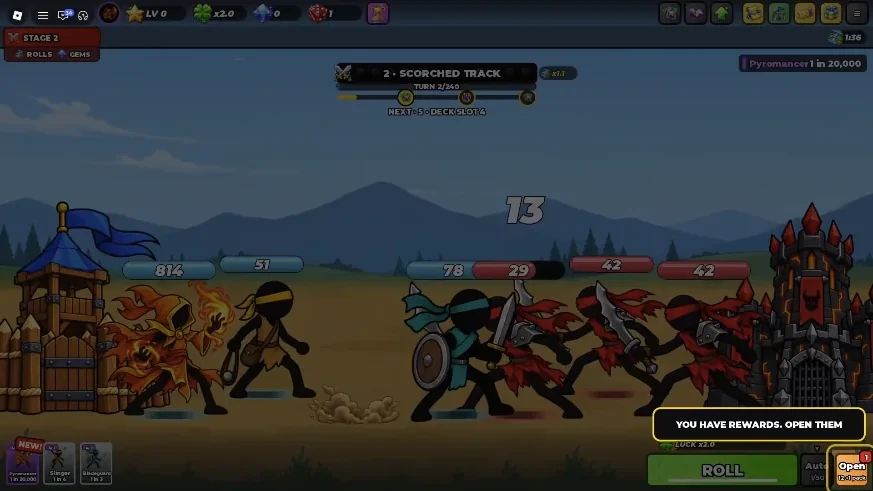
Follow the highlighted prompt in your current session. At 0:15 in the public video, “You have rewards. Open them” highlights Open beside Roll. That is an opening reward prompt; it is not evidence of the code Mail flow. Complete the action the game is showing before switching to a guide.
3. Roll, then inspect your army
The official loop is rolling cards to build an army. In the video’s battle view, card portraits sit along the bottom left and Roll / Auto controls appear at the bottom right. Use your current tutorial to add or equip a card, then check that the army in battle actually changes. This guide does not assume that a newly rolled card is automatically equipped.
4. Read the fight before replacing a card
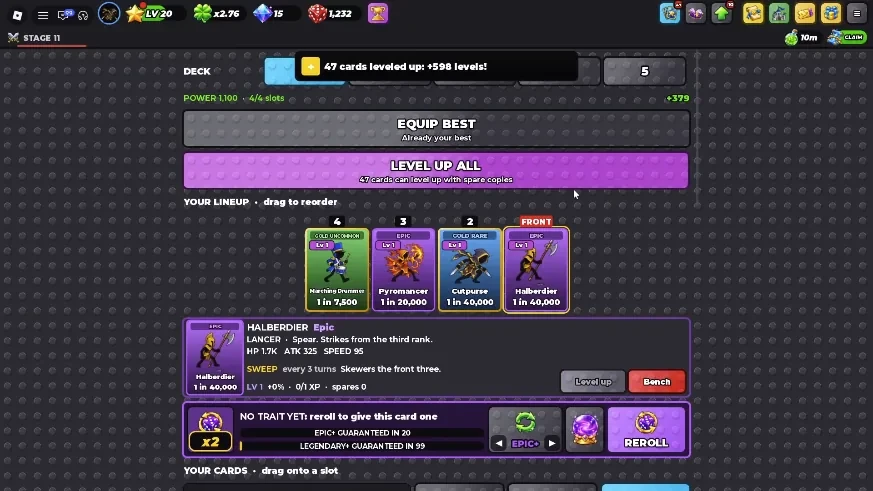
At 1:55, the recorded deck view shows a lineup and a selected card’s level, HP, ATK, SPEED and skill text. The selected Halberdier reads “SWEEP” with an effect every three turns. The rightmost slot is marked FRONT in this recording; check your current lineup rather than assuming a formation from a guide. Compare what a skill says with what happens in battle. Rarity alone does not tell you which card solves that fight.
5. Find the next visible objective
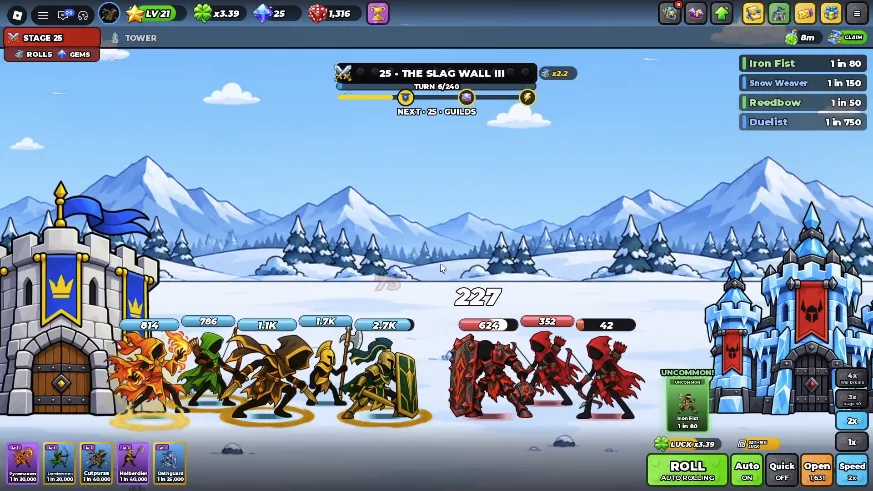
Read the objective underneath the stage or turn display. The footage shows a NEXT progress label, but its thresholds belong to that recorded session. Use the requirement shown on your account instead of treating a video’s stage as a permanent unlock rule. A useful first-session goal is one recorded battle and one clearly identified next objective.
6. Give each resource a purpose
Rolls are tied to acquiring cards in the developer’s description. Codes also list potions, crates, tomes and trait rerolls, but that description does not explain their exact effects or consumption rules. Read the item’s current preview, target and cost before using it. Do not infer a luck multiplier, potion duration, tome value or reroll result from its name.
When you get stuck: diagnose one fight
The checklist below is editorial advice for investigating a loss, not a tested build or an optimal upgrade order. Keep the target and team comparable, change one thing, and watch the next result.
| What you observe | What to check next |
|---|---|
| Your army falls quickly | Observe which unit takes damage first. Check its health, level and defensive skill text. Verify the actual formation in battle before changing a slot. |
| Enemies survive for a long time | Compare damage and skill descriptions with the enemy health that remains. A card with a useful effect for that encounter may matter more than its rarity. |
| A stronger-looking card changes nothing | Confirm it is equipped, then compare its current level and skill conditions. Watch one similar battle before spending more. |
| You are about to spend scarce items | Read the cost and preview, identify the problem the item would solve, and record the result of one change. This guide does not prescribe a fixed spending route. |
AFK does not automatically mean offline
The developer advertises AFK rolling, and Auto is visible in the public footage. Neither establishes offline earnings, how long a connection lasts, or which conditions enable Auto. Check that rolls continue in your current session before leaving the game unattended.
Watch the steps in real gameplay
Use these recordings alongside the checklist. The timestamps take you to a useful screen without making the video’s account, items or odds your own.
Start with the opening tutorial
Watch the first reward prompt, inspect the lineup, and see the battle screen in Velace’s short gameplay recording.
See rolling and battles together
RussoPlays’ longer session shows an army fighting as the rolling loop continues. Watch the interface and pace rather than treating the video title as verified odds.
Your first-session checklist
0 / 6Saved only in this browser. Tick a step after you do it in the game.
Sources & checks
Sources checked . Observations describe the source version.
- Ultrain Studios · Roblox experience ↗Developer listing
- Roblox Games API · universe 10765938934 ↗Developer description via Roblox
- Velace · Roblox - Roll a Stickman ↗Public gameplay · 21 October 2026 (UTC)
- RussoPlays · Rolling and battle session ↗Public gameplay · 21 October 2026